Circle Theorems Explorer
sensemake.uk/circle-theorems
The Circle Theorem Explorer is an interactive classroom tool for investigating the eight key circle theorems of the secondary curriculum. Each theorem is presented as a live diagram: labelled points sit on (or around) a circle and can be dragged freely, with angles and lengths updating in real time. The aim is not just to state each theorem but to make its truth feel inevitable. Pupils can push a configuration to its limits and watch the relationship hold.
The tool covers eight theorems:
- T1 - Angle at the Centre
- T2 - Angle in a Semicircle
- T3 - Angles in the Same Segment
- T4 - Cyclic Quadrilateral
- T5 - Tangent–Radius Perpendicular
- T6 - Two Tangents from an External Point
- T7 - Alternate Segment Theorem
- T8 - Perpendicular from Centre Bisects Chord
In every theorem, the structure is the same: drag the labelled points, watch the angles and lengths update, and use the toggles to reveal construction lines and reasoning that show why the theorem holds.
How the tool works
Each theorem has a diagram area (the circle and its draggable points) and a panel showing the theorem statement, live angle readouts, and a set of toggles. On desktop the panel sits to the left; on mobile it appears as a bottom sheet that can be expanded or collapsed so the diagram stays accessible for dragging. There is a classroom mode (in the settings) and a 'zoom' button on the panel to make the information easier to see.
The angle readouts in the panel update as you drag. For theorems that support it, toggling Show algebraic replaces the numerical angles with variables such as \(x\) and \(2x\), with the current values shown in brackets. Useful for moving from a specific case to the general relationship.
Each theorem also has a Connections section in the panel listing links to related theorems. Clicking a connection either switches to the related theorem directly or activates a toggle that reveals the connection on the current diagram.
Getting started
- Select a theorem from the dropdown at the top of the panel.
- Drag the labelled points to explore different configurations. The diagram updates instantly.
- Use the toggles to show or hide construction lines, labels, shading, and algebraic notation.
- Check the angle readouts in the panel to confirm the relationship holds across every position you try.
The active theorem is indicated by the badge (T1–T8) in the panel header. Use Reset in the toolbar to restore the default configuration for the current theorem. Undo / Redo step through your drag history.
Share links: the Share button generates a URL encoding the current theorem and, optionally, the toggle state. Pupils opening the link will find the theorem fixed (they cannot switch to another), but all points remain draggable, and they can still undo, reset to your starting layout, export an image, and change theme. This is useful for focusing a class on one theorem without distraction.
T1 - Angle at the Centre
Statement: The angle at the centre of a circle is twice the angle at the circumference when both are subtended by the same arc.
Points: A and B define the arc; C is a point on the major arc. The central angle \(\angle AOB\) and the inscribed angle \(\angle ACB\) are both displayed.
Toggles:
- Show angle at centre - draws and labels \(\angle AOB\) at O
- Show isosceles triangles - reveals triangles OAC and OBC, highlighting the equal radii that underpin the proof
- Show chord - draws chord AB
- Show segment shading - shades the minor segment
- Show algebraic - replaces numerical angles with \(x\) (inscribed) and \(2x\) (central)
Why this is powerful: Dragging C anywhere along the major arc keeps \(\angle ACB\) constant, which surprises many pupils. Toggling the isosceles triangles makes the reason visible without words. The two equal radii force the base angles to be equal, and the exterior angle relationship does the rest. The algebraic mode is particularly effective here as a bridge between the numerical observation and the general proof.
T2 - Angle in a Semicircle
Statement: The angle subtended at the circumference by a diameter is always 90°.
Points: A and B are the diameter endpoints (B is always diametrically opposite A); C is a point on the circle. Dragging A rotates the diameter; dragging C repositions the inscribed angle.
Toggles:
- Show as special case of T1 — overlays the central angle construction from T1, showing that a straight-line diameter gives a central angle of \(180°\), which forces the inscribed angle to be \(90°\)
- Show labels — shows/hides the point labels and angle annotations
Why this is powerful: The \(90°\) result can feel like a lucky coincidence until pupils see it framed as T1 with a central angle of \(180°\). The toggle makes that connection immediate. Placing C on the other semicircle is worth trying: \(\angle ACB\) remains \(90°\) regardless of which arc C sits on.
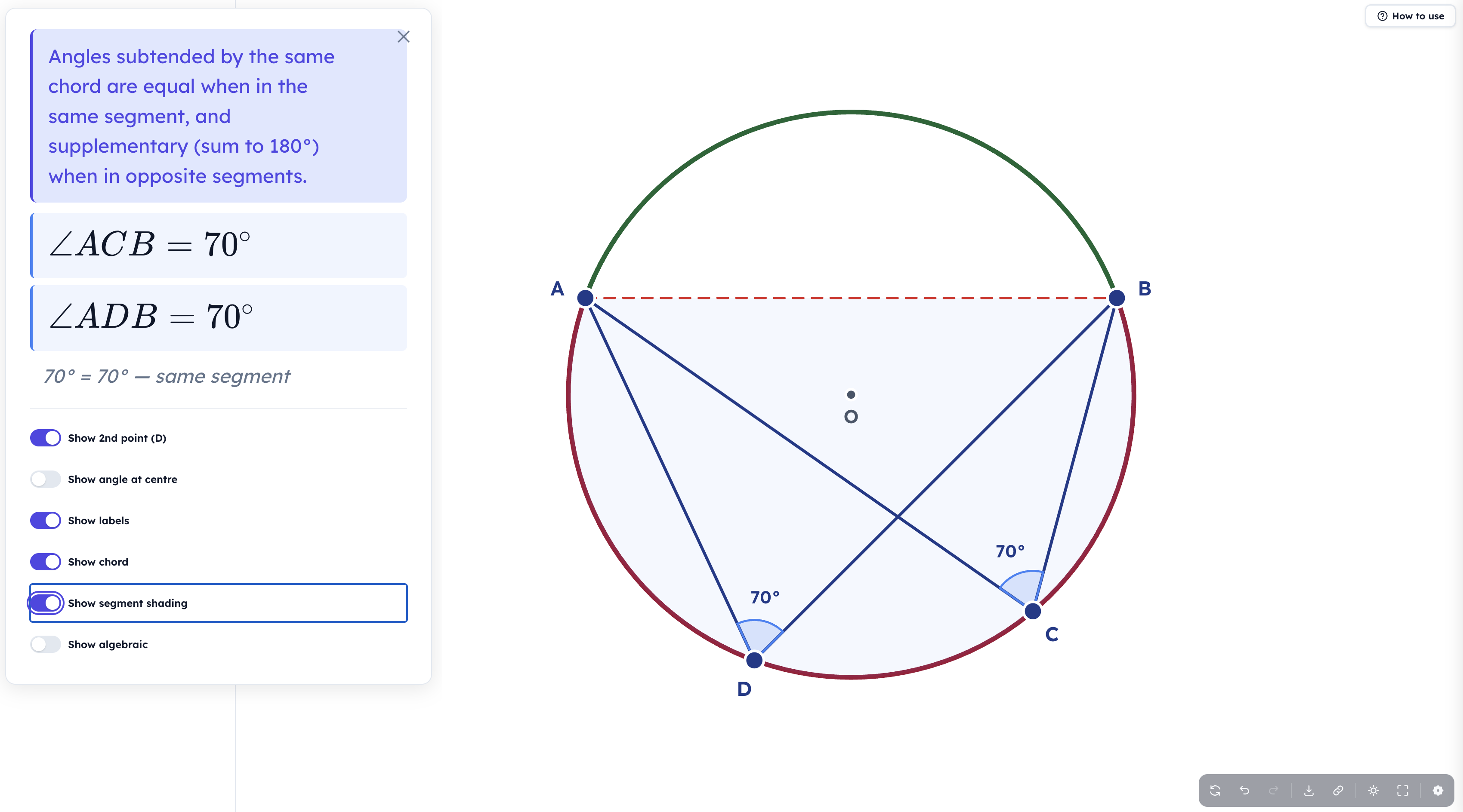
T3 - Angles in the Same Segment
Statement: Angles subtended by the same chord from the same segment are equal; from opposite segments, they sum to \(180°\).
Points: A and B are the chord endpoints; C and D are both inscribed angles on the circle. D is constrained to begin on the same side of the chord as C.
Toggles:
- Show 2nd point (D) - shows or hides point D and its angle, useful for focusing on C alone first
- Show angle at centre - displays \(\angle AOB\), connecting this theorem to T1
- Show chord - draws chord AB
- Show segment shading - shades the segment containing C and D
- Show algebraic - labels both inscribed angles \(x\) and the central angle \(2x\)
Why this is powerful: Pupils can drag D all around the same arc and watch \(\angle ADB\) match \(\angle ACB\) exactly. Dragging D past the chord into the opposite segment, where the two angles become supplementary rather than equal, is a moment worth pausing on. Toggling the centre angle shows both inscribed angles as halves of the same central angle, connecting T3 back to T1 elegantly.
T4 - Cyclic Quadrilateral
Statement: Opposite angles of a cyclic quadrilateral sum to \(180°\).
Points: A, B, C, D are four points on the circle forming a quadrilateral. The panel displays both opposite-angle sums: \(\angle A\) + \(\angle C\) and \(\angle B\) + \(\angle D\).
Toggles:
- Show opposite angle sums - displays the running totals of \(\angle A\) + \(\angle C\) and \(\angle B\) + \(\angle D\) in the panel
- Show diagonals - draws AC and BD across the quadrilateral
- Show why (central angles) - overlays the central angle construction that explains why opposite angles must sum to \(180°\)
- Show algebraic - labels angles \(x\), \(y\), \(180° − x\), \(180° − y\)
Why this is powerful: The Show why toggle is particularly effective: it reveals that opposite angles each intercept arcs that together make the full circle (\(360°\)), so each pair of opposite angles must sum to half of that, \(180°\). Dragging a vertex until the shape degenerates into a triangle, where that vertex's angle becomes \(0°\), is a useful edge case to explore.
T5 - Tangent–Radius Perpendicular
Statement: A tangent to a circle is perpendicular to the radius at the point of contact.
Points: P is the point of tangency on the circle. Dragging P rotates both the radius OP and the tangent line together, keeping the right angle between them fixed. A right-angle square at P confirms this visually at all times.
Toggles:
- Show labels - shows/hides point labels and the right-angle annotation
Why this is powerful: The right-angle square never moves relative to the radius and tangent, no matter where P is placed. This makes the theorem feel like a geometric inevitability rather than a fact to memorise. The Connections panel links directly to T6, which builds on this result.
T6 - Two Tangents from an External Point
Statement: Two tangents drawn from an external point to a circle are equal in length.
Points: X is the external point (draggable freely outside the circle). P and Q, the tangent points, update automatically as X moves.
Toggles:
- Show kite OPXQ - shades the kite formed by the two radii and two tangent segments, highlighting the line of symmetry through O and X
- Show radii - draws OP and OQ
- Show equal length marks - places tick marks on XP and XQ to emphasise the equal lengths
- Show angles \(\angle PXQ\), \(\angle POQ\) - displays the angles at X and O, which are supplementary (sum to \(180°\))
Why this is powerful: The kite overlay makes the symmetry of the configuration immediately visible. XP = XQ follows directly from the two congruent right-angled triangles OPX and OQX. Dragging X close to the circle (where P and Q converge) and very far away (where the tangent lines become nearly parallel) reveals the full range of the configuration.
T7 - Alternate Segment Theorem
Statement: The angle between a tangent and a chord at the point of tangency equals the inscribed angle in the alternate segment subtended by the same chord.
Points: P is the tangent point; A is the other end of the chord PA; C is a point in the alternate (opposite) segment. The tangent-chord angle at P and the inscribed angle \(\angle ACP\) are both displayed.
Toggles:
- Show tangent - shows or hides the tangent line, useful for focusing on just the angle relationship
- Show segment fill - shades the alternate segment (the one containing C) to clarify which segment is the "alternate" one
- Show why (diameter proof) - overlays the diameter construction through P that connects this theorem to T1
- Show algebraic - labels both equal angles \(x\)
Why this is powerful: This is often the theorem pupils find most surprising and difficult to get their heads around. The tangent feels unrelated to the inscribed angle on the other side of the chord. Dragging C anywhere around the alternate segment, watching the angle stay fixed while the tangent-chord angle matches it, builds the conviction that the result is robust. The Show why toggle reveals the proof via a diameter from P: a satisfying payoff for pupils ready to see where the result comes from.
T8 - Perpendicular from Centre Bisects Chord
Statement: The perpendicular from the centre of a circle to a chord bisects the chord.
Points: A and B are the chord endpoints. M, the foot of the perpendicular from O, updates automatically as A and B are dragged. The lengths AM and MB are displayed and always equal.
Toggles:
- Show congruent triangles - shades triangles OAM and OBM, which are congruent by RHS (right angle at M, shared hypotenuse OA = OB = radius, common side OM)
- Show equal length marks - places tick marks on AM and MB
- Show equal marks on radii - places tick marks on OA and OB to emphasise that both are radii
- Show labels - shows/hides all point and length labels
Why this is powerful: The congruent triangles toggle makes the proof fully visible on the diagram itself, without needing to write anything down. Dragging A and B to nearly the same position (short chord, M near the midpoint of a tiny segment) and to nearly diametrically opposite positions (long chord, M near the centre) shows that the bisection holds across the full range.
Classroom uses
Whole-class demonstration: Project the tool and work through a theorem together. Start with labels and readouts visible, then use the toggles progressively. First the numerical result, then the algebraic version, then the construction that explains why.
Guided discovery: Give pupils a specific theorem and ask them to try to "break" the relationship by dragging points to extreme positions. The tool's instant feedback makes this self-correcting.
Making connections: Use the Connections panel to move between related theorems, for example, establishing T1 first, then using it to explain T2 as a special case, T3 as a corollary, and T7 via the diameter proof. The connections are explicit in the UI, making the structure of the topic visible.
Starter or plenary: Load a theorem with algebraic mode on and labels off. Ask pupils to name the theorem and describe the relationship before revealing the statement.
Export: The export button downloads a PNG of the current diagram, suitable for including in worksheets, slides, or written feedback.
Settings
Three options are available from the Settings menu in the toolbar:
- Allow points to overlap - by default, points are kept a minimum distance apart to prevent degenerate configurations. Turning this off allows pupils to explore edge cases such as C coinciding with A or B in T1.
- Snap to special angles - snap points to multiples of \(30°\) and \(45°\) when dragging, making it easier to set up clean configurations for class demonstration.
- Classroom mode - simplifies the interface for whole-class projection.
Pedagogical roots
The Circle Theorem Explorer is built around the idea that a theorem understood through variation is more durable than one memorised from a static diagram. By making every configuration draggable and every relationship live, the tool draws on the principles of Variation Theory, the idea that understanding what something is requires encountering what it is not, and seeing what changes while the essential relationship stays the same. The toggle system reflects the same principle: construction lines and algebraic labels are revealed progressively, so pupils build understanding rather than read it off a completed diagram.