Trimension - 3D Geometry
korovatron.co.uk/trimension
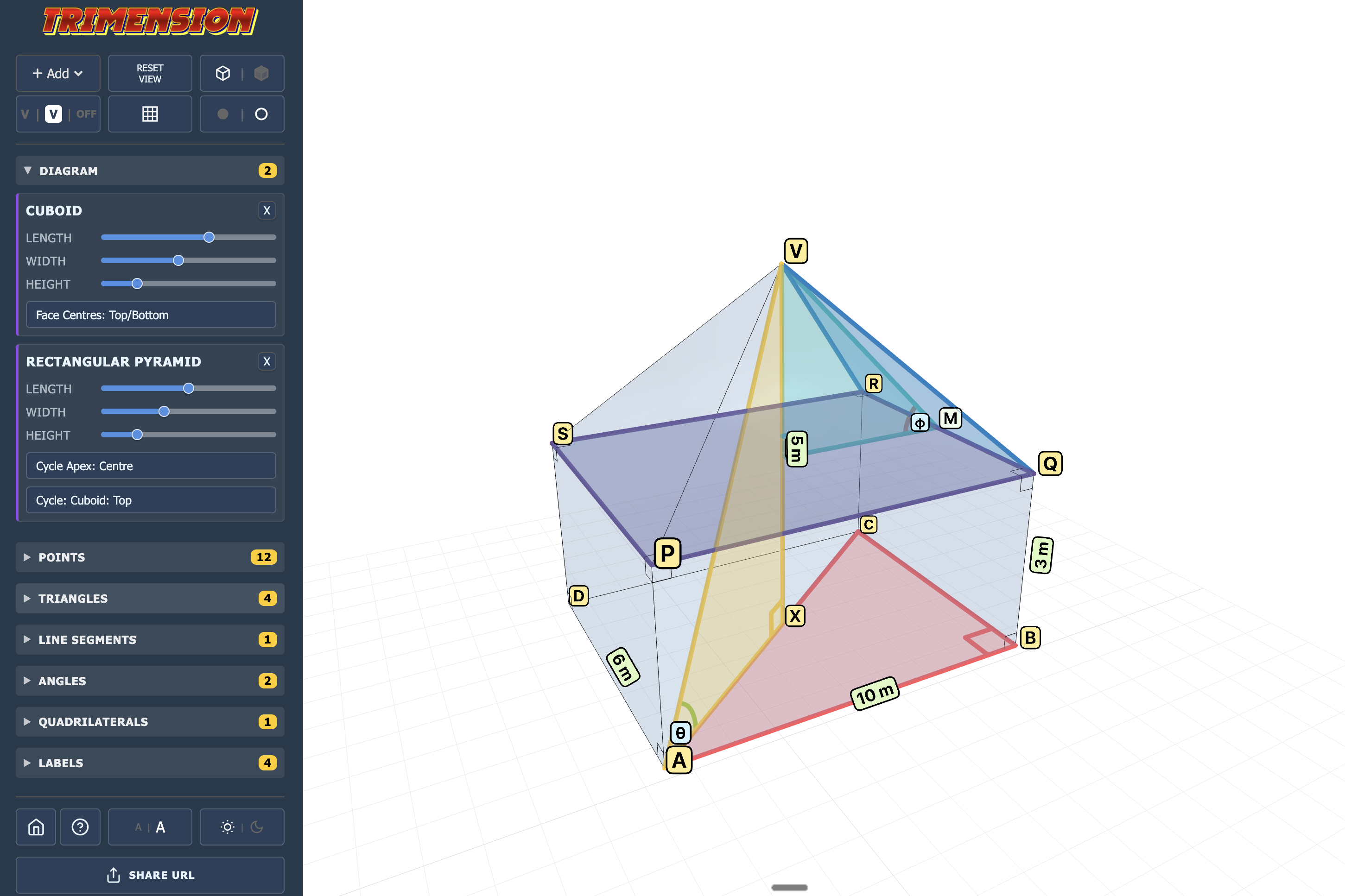
Trimension is a dynamic 3D geometry tool designed to bridge the gap between complex 3D diagrams and the 2D calculations required to solve them. While many 3D tools feel like CAD software, Trimension is built specifically for the maths classroom, allowing teachers to build composite solids and instantly "extract" internal planes for analysis.
How the tool works
The interface is designed for rapid construction during a lesson. You start with a base shape and build upwards and inwards:
- Adding Shapes: Use the Add menu to place cuboids, pyramids, or prisms. You can adjust their dimensions (length, width, height) in the Diagram panel to create composite objects like houses or sheds.
- Drawing Internals: This is the core of the tool. By selecting labelled vertices from the Points list in sequence, you can create new line segments, internal triangles, or cross-sectional quadrilaterals.
- 2D Inspection: The standout feature. Clicking Inspect on any created triangle or quadrilateral opens a dedicated 2D view. This view is clean, correctly labelled, and shows the shape as if it were laid flat on a piece of paper.
- Visibility Toggles: Every segment or plane you create can be hidden or shown using the sidebar lists. This allows you to declutter a diagram as you move through different parts of a multi-step problem.
- Navigation: The 3D view is fully interactive. Use a mouse to rotate and zoom, or touch gestures (pinch/drag) on a tablet. If the orientation becomes confusing, the Reset View button snaps you back to the default perspective.
Classroom Uses
The primary challenge in teaching 3D geometry, particularly for GCSE and A-Level, is helping pupils "see" the right-angled triangles hidden inside a solid.
Identifying Hidden Triangles:
Start with a cuboid and ask pupils to find the longest possible line that could fit inside it (the space diagonal). Use the tool to draw the base diagonal first, then the space diagonal, and finally the vertical height to reveal the internal right-angled triangle.
Bridging 3D to 2D:
A common stumbling block is the distortion caused by 3D perspective (e.g., a right angle looking like an obtuse angle).
- Strategy: Construct an internal triangle in 3D, then use the Inspect tool. Seeing the shape "pop out" into a perfect 2D representation helps pupils understand that the rules of Pythagoras and Trigonometry they already know still apply.
Scaffolding Multi-Step Problems:
For complex "Angle between a line and a plane" problems, you can pre-build the diagram and share it via the Share URL. Pupils can then open the exact same setup and toggle the visibility of different segments as they work through the calculation steps.
Teaching Strategy: "The Surgeon’s Approach"
- The Patient: Display a composite solid (e.g., a square-based pyramid on a cuboid).
- The Incision: Ask the class which vertices define the plane they need to find an angle within. Select those points to create the triangle.
- The Extraction: Use the Inspect button to "remove" that triangle from the 3D body.
- The Analysis: Perform the calculations on the board using the 2D view as the primary reference. This mimics the professional habit of drawing separate 2D sketches for every 3D sub-problem.
Pedagogical Value
Trimension removes the "artistic barrier" of 3D geometry. Pupils who struggle to draw 3D shapes often find the topic inaccessible; this tool allows the focus to remain entirely on the spatial reasoning and the subsequent algebra. By providing an instant, accurate 2D extraction, it validates the pupil's mental model and builds confidence in decomposing complex 3D space.