Unit Circle Explorer
sensemake.uk/unit-circle-explorer
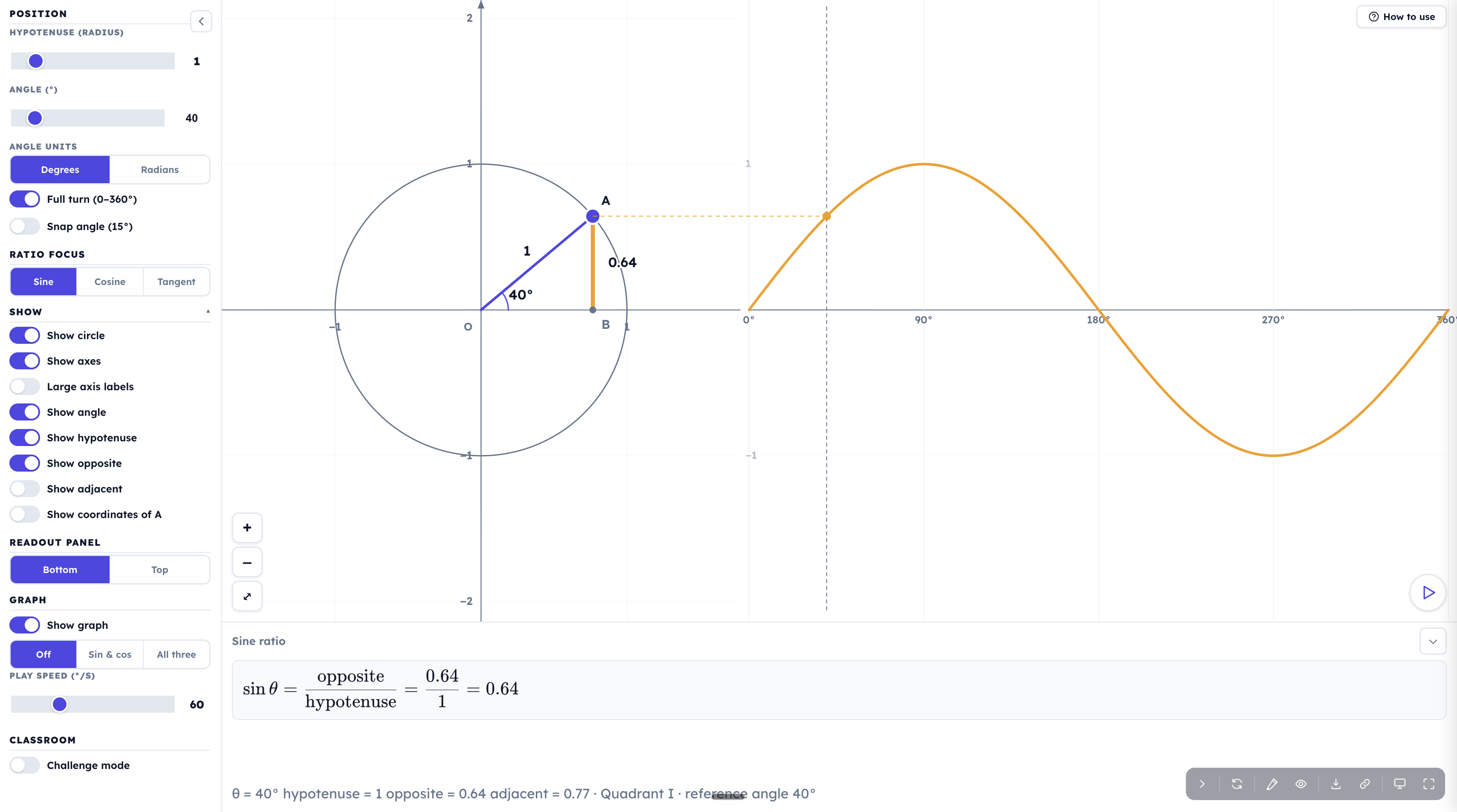
The Unit Circle Explorer builds trigonometry outward from a single draggable right-angled triangle. Drag point \(A\) around a circle to change the angle, drag a slider to change the circle's radius, and a panel reads off the chosen ratio as a live fraction of the measured side lengths. Its defining move is that the hypotenuse is adjustable, not fixed at 1, so the same diagram carries a class from right-angled-triangle trigonometry at GCSE, through the unit circle and exact values, to the sine and cosine graphs at A-Level.
How the tool works
A circle is drawn with a right-angled triangle inside it: point \(A\) sits on the circumference, the hypotenuse runs from the centre out to \(A\), and the opposite and adjacent sides drop to the axes. Everything redraws continuously as you drag, and a readout panel keeps the chosen ratio in view at all times.
- Drag \(A\), or set the angle exactly. Drag the point around the circle, or use the Angle slider. Tapping the angle value lets you type a number directly, and Snap angle (15°) locks dragging to clean multiples for tidy discussion points.
- The variable hypotenuse. The Hypotenuse (radius) slider stretches the triangle from \(0.5\) up to \(5\). This is the feature that distinguishes the tool: most unit-circle apps fix the radius at 1, but here pupils can watch a general triangle and the ratio inside it before they ever meet the special case.
- The live ratio readout. The panel shows the focused ratio decomposed in full, for example \(\sin\theta = \dfrac{\text{opposite}}{\text{hypotenuse}} = \dfrac{0.64}{1.00} = 0.64\). The word "ratio" stops being vocabulary and becomes a division pupils can see being carried out.
- Ratio focus. Switch the panel and the highlighted sides between Sine, Cosine and Tangent without changing anything else on screen.
- Full turn. A toggle extends the angle range from \(0\)–\(90^\circ\) to a complete \(0\)–\(360^\circ\), with quadrant and reference-angle information appearing in the readout.
- Unroll into a wave. Show graph lays the circle out flat as a sine, cosine or tangent curve, with a dashed line linking \(A\) to its point on the graph; a play button sweeps the angle automatically.
- Advanced mode. A toggle at the top of the sidebar unlocks the reciprocal ratios, a tangent-line construction, radians, and decimal-place control, the A-Level layer.
- Challenge mode. A set of self-checking tasks that turn the diagram green when solved and follow up with a "think" question.
Getting started
- Drag point \(A\). The angle and the side lengths update live, and the panel shows \(\sin\theta\) as a fraction of those lengths.
- Set the hypotenuse to 1. With the radius at 1 the opposite side equals \(\sin\theta\), there is nothing left to divide. This is the moment the unit circle "drops out" of the general triangle.
- Read the panel. Confirm what pupils are seeing: opposite over hypotenuse, then the decimal it evaluates to.
- Land on a special angle. Turn on Snap angle, or type \(30\), \(45\) or \(60\), and an Exact line appears beneath the readout (for example \(\sin 30^\circ = \tfrac{1}{2}\)).
- Open it up. Turn on Full turn to drag past \(90^\circ\), switch the Focus to follow cosine or tangent, or turn on Show graph to watch the wave build. Turn on Challenge mode when you want pupils working independently.
From triangle to ratio
This is the conceptual heart of the tool, and the reason to reach for it over a static unit-circle diagram.
Holding the angle, stretching the hypotenuse. Fix the angle (say \(30^\circ\)) and drag the Hypotenuse slider from 1 to 4. The opposite side grows with the triangle, but the value of \(\sin 30^\circ\) in the panel does not move from \(0.5\). Pupils can tabulate \(\text{opposite} \div \text{hypotenuse}\) at each setting and discover that the quotient is invariant. The ratio depends only on the angle, never on the size of the triangle, which is precisely the property that lets trigonometry measure a height nobody can reach.
Collapsing to the unit circle. Set the hypotenuse back to 1 and the ratio readout simplifies: the denominator becomes 1, the fraction disappears, and the opposite side is \(\sin\theta\). Pupils have now seen, rather than been told, why the unit circle is the natural place to read sine and cosine straight off the diagram.
Tangent and the vanishing adjacent. Switch the focus to Tangent and the panel reads \(\tan\theta = \dfrac{\text{opposite}}{\text{adjacent}}\). Drag \(A\) towards \(90^\circ\) and watch the adjacent side shrink towards zero while the value climbs without limit. The undefined value of \(\tan 90^\circ\) becomes a behaviour pupils have watched happen, not a rule they have to accept.
The unit circle proper
Coordinates of \(A\). With the hypotenuse at 1, turn on Show coordinates of A. The \(x\)-coordinate is exactly \(\cos\theta\) and the \(y\)-coordinate is exactly \(\sin\theta\), so \(A = (\cos\theta,\, \sin\theta)\). Because \(A\) always lies on the circle of radius 1, every position satisfies \(x^2 + y^2 = 1\), which is Pythagoras on the triangle and, read the other way, the identity \(\sin^2\theta + \cos^2\theta = 1\). The identity is no longer an abstract fact but a description of where \(A\) is allowed to sit.
Beyond the right angle
Turning on Full turn changes the topic from triangle ratios to the circular functions, while keeping the same diagram.
Quadrants and signs. Drag \(A\) into the second quadrant: it sits above the \(x\)-axis but to the left of the \(y\)-axis, so \(\sin\theta\) stays positive while \(\cos\theta\) turns negative. The panel names the quadrant, and the sign of each ratio follows directly from which side of which axis \(A\) is on. A far more durable account than memorising "CAST".
Reference angles. The readout reports the reference angle alongside the quadrant. Make \(\sin\theta = 0.5\) at \(30^\circ\), then find the same value again past \(90^\circ\): it reappears at \(150^\circ\), the mirror image in the vertical axis, and the shared reference angle of \(30^\circ\) makes the relationship \(\sin\theta = \sin(180^\circ - \theta)\) visible rather than asserted.
Exact values, degrees and radians
The Exact line. Whenever \(A\) lands on a special angle (\(0\), \(30\), \(45\), \(60\), \(90^\circ\) and their partners around the circle), an Exact line appears showing the surd or fraction value. For instance \(\cos 60^\circ = \tfrac{1}{2}\) or \(\sin 45^\circ = \tfrac{\sqrt{2}}{2}\). Pupils meet exact values attached to a triangle they can see, with the correct sign supplied automatically in each quadrant.
Switching to radians. Under Advanced, the Angle units control relabels everything in radians, so the same special angles read as fractions of \(\pi\): \(30^\circ\) becomes \(\tfrac{\pi}{6}\), \(45^\circ\) becomes \(\tfrac{\pi}{4}\), and so on. Toggling between the two units on a fixed angle is a quick, low-stakes way to rehearse the conversion.
Unrolling the circle into a wave
Show graph. This lays the circle out flat into its corresponding curve. With sine focus, a dashed line links \(A\) straight across to the point on the graph at the same height, so pupils see the wave's height is the opposite side. Drag \(A\), or press play to sweep the angle automatically (the Play speed slider sets the pace).
Why the wave has the shape it has. Because the curve's height is the opposite side, sliding the Hypotenuse scales the whole wave up and down, a concrete first encounter with amplitude. Sweeping slowly shows where the curve is steepest (near the axis crossings) and where it flattens (at the peaks).
Compare curves. The Compare curves control overlays Sin & cos together, or All three. The point where the sine and cosine curves cross is the same \(45^\circ\) where the triangle is isosceles, a satisfying link back to where the lesson may have started.
Reciprocal ratios and the tangent line (Advanced)
A single Advanced toggle at the top of the sidebar unlocks the A-Level layer of the tool. Switching it on reveals the reciprocal ratios, a tangent-line construction, a paired-graph option, a Decimal places control (2, 3 or 4 dp), and the Angle units switch for radians. Switching it back off returns the panel to the GCSE-facing set and resets these extras, so a class never meets them by accident.
The reciprocal ratios. Choose a focus (Sine, Cosine or Tangent) and flip Reciprocal (sec / csc / cot) on. The panel switches to the reciprocal of the focused ratio: sine becomes \(\csc\theta\), cosine becomes \(\sec\theta\), tangent becomes \(\cot\theta\). Crucially, the readout shows the reciprocal both ways at once, for example \(\sec\theta = \dfrac{\text{hypotenuse}}{\text{adjacent}} = \dfrac{1.00}{0.50} = \dfrac{1}{\cos\theta} = 2\). Pupils see that "secant" is not a new measurement to take but the same triangle read upside-down, and that \(\sec\theta = \tfrac{1}{\cos\theta}\) is a consequence of swapping numerator and denominator, not a definition to memorise.
The tangent line. The Tangent line control (Off / Fixed / At P) draws the construction that names all six functions on one diagram.
- Fixed places tangent lines at \((1,0)\) and \((0,1)\), with the four segments \(\tan\theta\), \(\sec\theta\), \(\cot\theta\) and \(\csc\theta\) marked against the circle. This is the classical "all six ratios as lengths" picture.
- At P draws a single tangent at the moving point \(A\), perpendicular to the radius. Every ratio now appears as a length on that one line: the two pieces of the tangent either side of \(A\) are \(\tan\theta\) and \(\cot\theta\), and the distances out to where the line meets the axes are \(\sec\theta\) and \(\csc\theta\).
Strategy - the three Pythagorean identities from one diagram. With At P selected, turn on Hypotenuse, Opposite and Adjacent. Because the tangent is perpendicular to the radius, three right-angled triangles share the point \(A\), and each is an identity: the inner triangle gives \(\sin^2\theta + \cos^2\theta = 1\), the triangle along the \(x\)-axis gives \(1 + \tan^2\theta = \sec^2\theta\), and the triangle along the \(y\)-axis gives \(1 + \cot^2\theta = \csc^2\theta\). The two identities pupils usually take on trust are visible as the same Pythagoras applied to two more triangles.
Example - seeing an asymptote. In At P, drag \(A\) towards \(90^\circ\). The tangent line tilts towards horizontal and the point where it crosses the \(x\)-axis slides away without limit: \(\sec\theta \to \infty\). Drag towards \(0^\circ\) and a different intercept escapes. These are the asymptotes pupils meet in the reciprocal graphs, here as something the construction does rather than a feature to be plotted.
Pairing a graph with its reciprocal. With Show graph on and Advanced active, Compare curves gains a Pair option, which overlays the focused function with its reciprocal, cosine with secant, sine with cosecant, tangent with cotangent. Where the parent curve touches \(\pm 1\) the reciprocal touches it too; where the parent crosses zero the reciprocal flies off to its asymptote. The relationship between a function and its reciprocal becomes a single picture rather than two graphs to compare from memory.
Challenge mode
Turning on Challenge mode presents a sequence of eleven short tasks: make a given angle, hit a target ratio, find where sine meets cosine, reach an angle in a particular quadrant. The diagram turns green the instant a task is satisfied, and a short feedback line explains why the answer works before posing a follow-up "think" question to push the reasoning further. Pupils can jump between challenges with the selector or Skip one that isn't biting.
For setting up a class. The tool's share link can fix the exact starting setup while leaving \(A\) draggable, and individual affordances can be locked as can advanced mode. You might allow pupils to drag \(A\) but stop them changing the hypotenuse or the focus. Ticking Start in challenge mode on the share link drops the class straight into the tasks.
Classroom uses
Building the ratio from scratch (KS4). Keep the hypotenuse general, focus on sine, and ask "what stays the same as the triangle grows?" before you ever say the word "sine". Strategy: have pupils fill a short table of opposite, hypotenuse and their quotient at four different radii for a fixed angle; the constant quotient is then named as \(\sin\theta\). The definition arrives as a summary of what they have measured.
The bridge to the unit circle (KS4 into KS5). Run the same triangle, then collapse the hypotenuse to 1 and turn on the coordinates of \(A\). Example: ask pupils to predict the coordinates at \(60^\circ\) before revealing them, then connect \(A = (\cos\theta, \sin\theta)\) to \(x^2 + y^2 = 1\). This is the cleanest route from "ratios in a triangle" to "functions on a circle".
Signs and symmetry without mnemonics (KS5). With Full turn on, set a value such as \(\sin\theta = 0.5\) and ask pupils to find every angle in \(0\)–\(360^\circ\) that produces it. Strategy: let them reason from the quadrant and reference-angle readout rather than a rule, so that \(\sin\theta = \sin(180^\circ - \theta)\) and the quadrant sign patterns are conclusions, not starting points.
From circle to graph (KS5). Turn on Show graph and play the sweep. Example: pause at the steepest and flattest points and ask why the curve behaves as it does there; then slide the hypotenuse and ask what has happened to the amplitude and why. Overlaying all three curves invites the question of where, and why, they intersect.
Exposing a misconception. Switch to tangent focus and drag towards \(90^\circ\). Pupils who expect \(\tan 90^\circ\) to be "very large but finite", or simply \(1\), watch the adjacent side collapse and the ratio run away, which makes "undefined" mean something specific.
Pedagogical roots
The Unit Circle Explorer rests on the idea that the trigonometric ratios are best understood as a single object seen from several angles, and on the Concrete–Pictorial–Abstract progression that underpins much of the curriculum: a measured triangle, a diagram on a circle, and finally the symbolic ratio and identity. What the tool adds is continuity of representation. Because the hypotenuse is a slider rather than a fixed 1, the right-angled triangle of GCSE and the unit circle of A-Level are not two separate diagrams to be reconciled later but the same diagram at two settings, and the move between them is something pupils perform with their own hands.
It also leans on the value of variation: holding the angle while varying the hypotenuse isolates the one thing that does not change, so the invariance of the ratio is discovered rather than declared. The live readout keeps the ratio's definition, a quotient of two lengths, permanently in view, reducing the load of remembering what \(\sin\theta\) means while pupils work on what it does. Created by sensemake.uk.