Number Grid
sensemake.uk/number-grid
The Number Grid is a flexible visualiser for exploring the structure of number. A configurable grid (rows, columns, start value, step) pairs with category overlays, a shading palette, hide-and-reveal cells, and a rich Number Card that opens on any cell to expose factorisation, representations, neighbours, and sequence memberships. The aim is to make the structure of number visible rather than just its sequence.
How the tool works
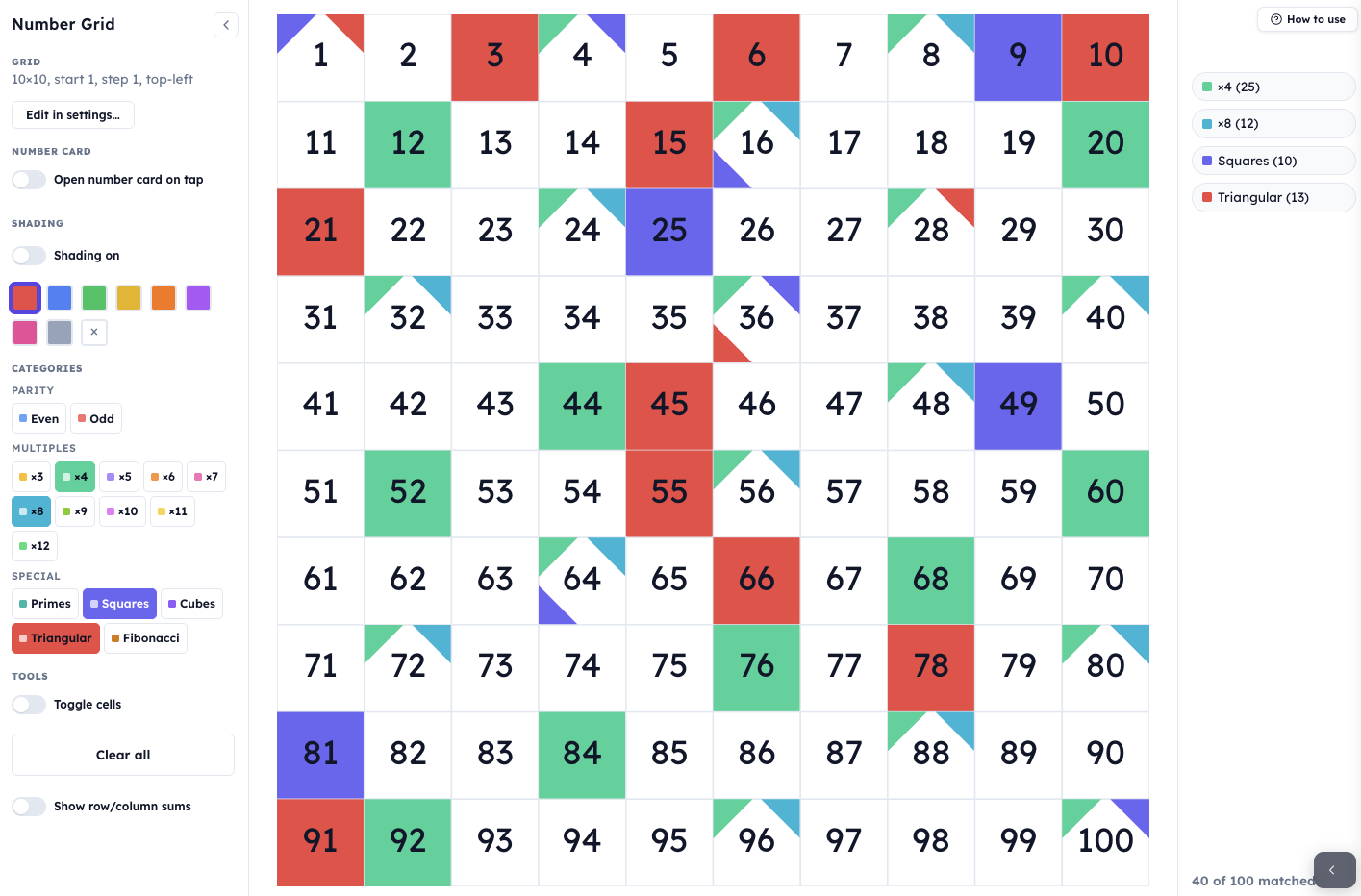
- The main area shows the grid itself - a configurable array of numbered cells. Cells can be shaded, overlaid with category corner-wedges, hidden, or tapped to open a detailed Number Card.
- The sidebar (left on desktop, collapsible drawer on mobile) holds the three panels you'll reach for during a lesson: Shading (palette + eraser), Categories (parity, multiples, special sets), and Tools (Toggle cells, Clear all, row/column sums).
Every cell on the grid can carry up to four category wedges in its corners. If more categories apply, extras collapse into a small +N badge. Manual shading (from the palette) sits underneath the category wedges, so both can be visible at once.
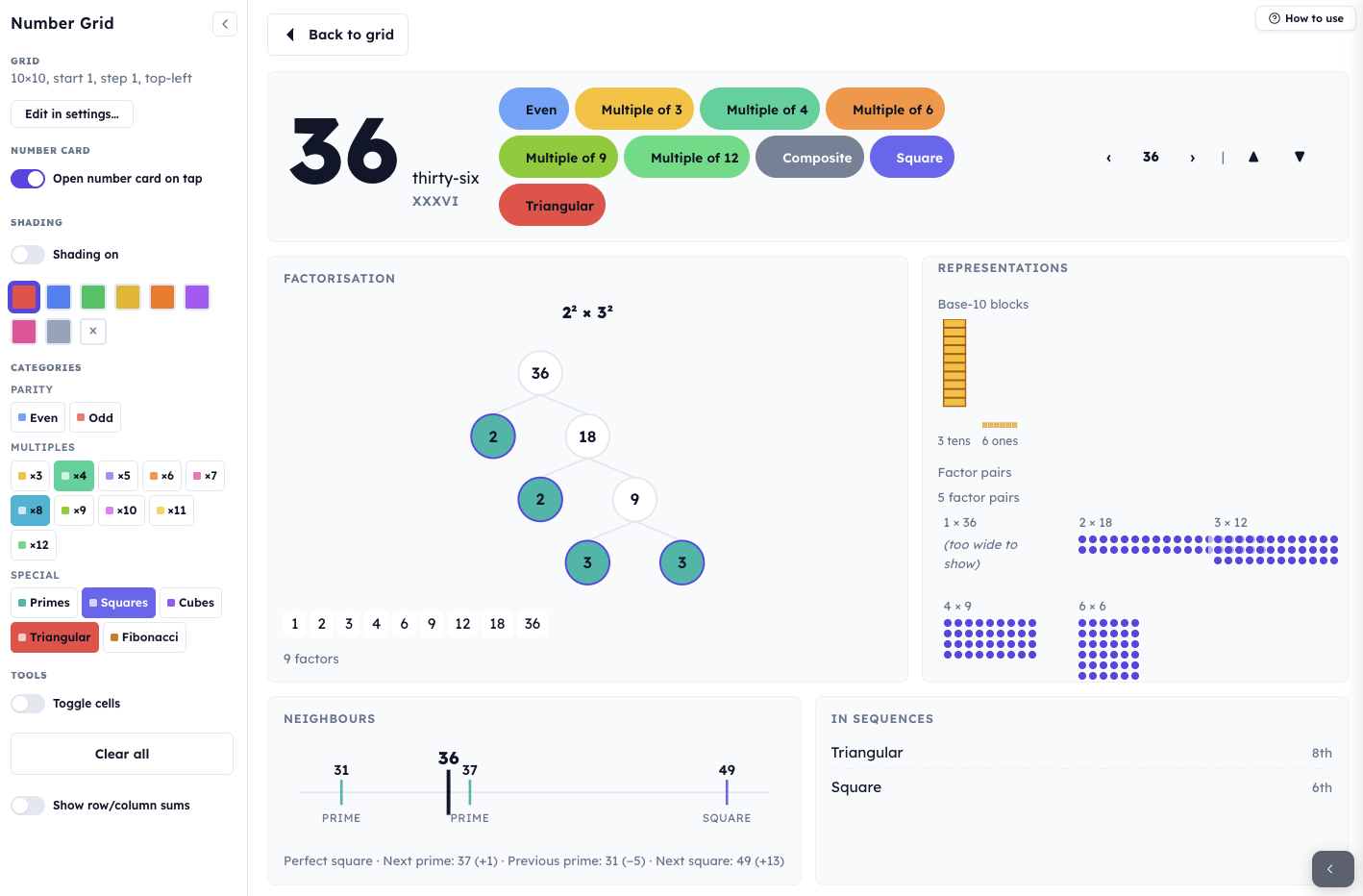
The most powerful feature is Zoom mode. With Zoom on, tapping a cell slides in the Number Card - a four-panel profile of that number covering its prime factorisation (with factor tree and factor pills), visual representations (base-10 blocks and every factor pair as a dot array), its neighbours on a number line, and its position in named sequences.
Getting started
- Check the default setup. On opening you'll see a 10×10 grid running from 1 to 100, top-left origin.
- Turn on a category in the sidebar — try ×4 or Squares. Coloured corner wedges appear on matching cells and a legend in the corner reports how many cells matched.
- Shade something manually. Flip Shading on, pick a colour, and click or drag across cells. Use the × chip to erase.
- Open a Number Card. Click Open number card on tap, then tap any cell. Use the arrows or ← → ↑ ↓ keys to move between numbers. Esc or Back to grid closes the card.
- Reshape the grid by clicking Grid settings in the toolbar: change rows, columns, start value, step, or origin corner.
Configuring the grid
The Grid settings modal is where the grid's shape and sequence are set.
- Rows and Columns can each range from 1 to 20 (default 10 × 10).
- Start sets the value of the first cell.
- Step sets the increment between consecutive cells. Negative steps count down; a step of 2 gives odds or evens; a step of 7 produces a multiplication-table strip.
- Origin determines which corner the sequence starts in: Top-left (default), Top-right, Bottom-left, or Bottom-right. Switching origin does not change which numbers are shown, only where they sit. A Bottom-left origin matches the orientation pupils meet in a coordinate grid.
- Show shading counts toggles the small numbers next to each entry in the corner legend.
The modal's On screen section lets you shrink the grid on screen (50–100%) and align it vertically and horizontally. useful for projecting alongside a second window, or for leaving whitespace to annotate over.
Shading the grid
Eight colours give enough range to colour three or four different partitions of the grid simultaneously. Handy for Venn-style questions like which cells are even but not a multiple of 3? where you'd normally reach for two different colours and a third for the overlap.
The Number Card
With Zoom turned on in the toolbar, tapping any cell opens the Number Card: a four-panel deep-dive into a single number.
Hero strip. Along the top: the numeral in large display type, the number as a word (thirty-six), its Roman numeral (XXXVI), and a row of coloured classification chips, every category that applies, including two that don't appear as sidebar toggles: Composite and Palindrome. Clicking an interactive chip (e.g. Prime) closes the card and shades that category across the whole grid; a fast way to move from the specific to the general. The right-hand navigation steps to the next or previous number (← →), or to the cell directly above or below on the grid (↑ ↓).
Factorisation panel. Shows the prime factorisation as a tidy product (e.g. \(2^2 \times 3^2\)), a factor tree with the primes as leaf nodes, and a row of factor pills listing every factor in order (1, 2, 3, 4, 6, 9, 12, 18, 36 · 9 factors for 36). Primes have a single-leaf tree; a visual signature pupils come to recognise.
Representations panel. Two visual representations side by side. First, base-10 blocks (Dienes) showing the number as thousands, hundreds, tens, and ones (displayed for 1–9999). Second, every factor pair drawn as a dot array: for 36, \(1 \times 36\), \(2 \times 18\), \(3 \times 12\), \(4 \times 9\), \(6 \times 6\). Arrays up to 20 columns wide are drawn. The visual symmetry of a square factor pair, the \(6 \times 6\), is a direct, wordless argument for why square numbers have an odd number of factors.
Neighbours panel. A number line with the current number at its centre and the nearest primes and squares on either side marked and labelled. For 36: previous prime 31 (−5), next prime 37 (+1), next square 49 (+13). Questions like which prime is 36 closest to? become answerable at a glance.
In sequences panel. Lists every named sequence the number belongs to, with its ordinal position. The sequences detected are: Triangular, Square, Cube, Fibonacci, Prime, Factorial (labelled n!), Power of 2 (labelled 2ⁿ), Perfect number (6, 28, 496, 8128), and Tetrahedral. Numbers that belong to several families, 36 is both the 6th square and the 8th triangular, 64 is a square and a cube and a power of 2, make those overlaps explicit in a way that listing sequences on the board rarely does.
Classroom uses
Noticing the columns. On a 10-column grid turn on Odd and Even; the columns stripe. Add ×5: two full columns. Add ×3: a diagonal. Ask pupils to predict before flicking a switch: "if I turn on ×4, which cells will light up?" Then change to a 6-column grid and turn the same categories back on. Which patterns survive the re-shape, and which change? This is the step from that's the rule for this grid to that's a property of the number.
Primes on different bases. On a 10-column grid, primes cluster in the 1st, 3rd, 7th, and 9th columns, because the other columns are multiples of 2 or 5. Switch to a 6-column grid: every prime above 3 sits in exactly two columns (1 more or 1 less than a multiple of 6). Zoom into any prime: the factor tree is a single leaf. Tap a composite: the tree branches.
Factor pair comparison. Zoom into 24, 36, and 48 in turn. Which has the most factor pairs? Which has a dot array closest to square? This is the vocabulary of highly composite introduced through what pupils can see. Then compare a prime (7) with 4 and 9: the prime has one pair (\(1 \times 7\)), 4 has two (\(1 \times 4\), \(2 \times 2\)), 9 has two (\(1 \times 9\), \(3 \times 3\)). Squares always have an odd number of factors.
Counting in steps. Open Grid settings and change the step. Count in 3s from 1, in 7s from 3, in 25s from 0. With a step of 7 on a 10-column grid the multiples of 7 tilt (because 7 and 10 share no common factor). With a step of 2, every column is all odd or all even. Pair with Show row/column sums for quick predictions.
Hide-and-reveal puzzles. Use Toggle cells to hide a handful of numbers. A hidden cell on a standard 1–100 grid is trivial; a hidden cell on a grid counting in 7s from 3, with the start also hidden, becomes an algebraic reasoning task. Share the prepared grid with Allow hide/reveal on so pupils can experiment independently.
Place value conversation. Zoom into 248, then 284, then 482. Same digits, different base-10 blocks. Pair with the word name and Roman numeral in the hero strip for cross-representation talk.
Starter routine. Project a blank grid with three cells shaded in the same colour; for example 4, 9, and 16. Ask pupils to name the rule. Reveal the category (Squares) by clicking it in the sidebar. Then ask what the next shaded cell would be.
Pedagogical roots
The Number Grid is built on a simple idea: the 1–100 grid in ten columns that pupils meet at primary is only one configuration of a far richer object. Changing the shape of the grid, the step, or the origin changes which patterns become visible without changing the numbers themselves. Pupils who have only seen the standard version often hold the patterns-in-columns as properties of the grid rather than as properties of the numbers; varying the grid is the direct way to unseat that misconception.
The Number Card extends the same principle to individual numbers. A number isn't just a point on a line: it's an object with a prime factorisation, a factor-pair structure, a base-10 decomposition, named neighbours, and memberships in a family of sequences. The card shows all of those at once, so a question like "what is 36?" gets answered by looking, not by calculating.