Confidence Intervals Exporer
shore.org.uk/resources/confidence-interval-app
The Confidence Interval Explorer is an interactive visualisation designed to bridge the gap between calculating a margin of error and truly understanding what a confidence interval represents. By simulating both individual samples and long-run repetitions, the tool confronts common misconceptions about probability and the frequentist interpretation of statistics.
The tool is split into two primary functional areas:
- Single Sample View - visualise how individual data points and sample size determine the width of a single interval.
- Long-run CI Performance - simulate multiple samples (\(N\)) to see the "capture rate" in action against the true population mean.
How the tool works
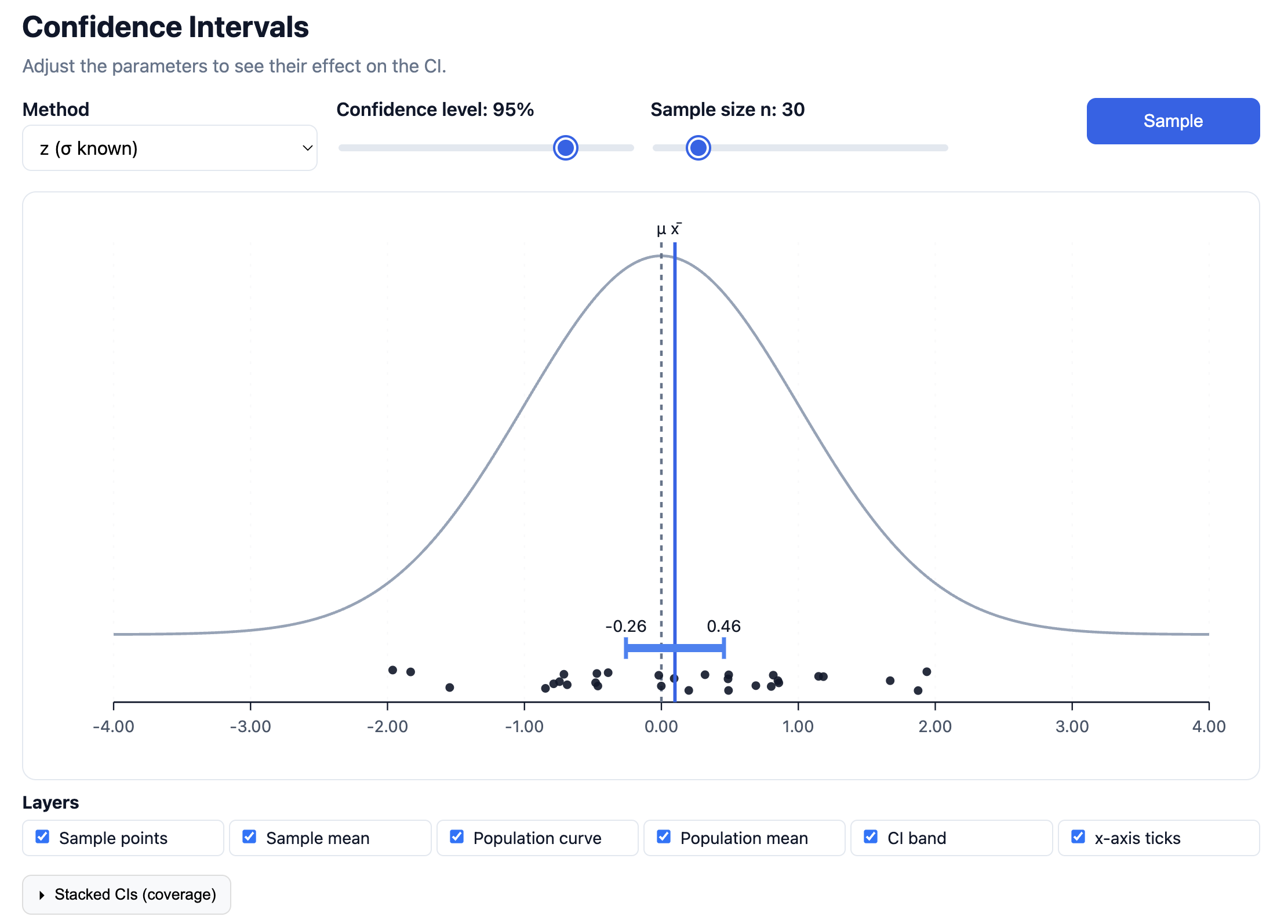
The interface is built around a dynamic Normal distribution curve representing the population. Users control the "ingredients" of the interval, Method (\(z\) vs \(t\)), Confidence Level, and Sample Size (\(n\)), and watch the interval react in real-time.
- The Main Plot: Displays the population curve with the true mean (\(\mu\)) as a fixed vertical dashed line. When a sample is taken, the individual data points appear on the x-axis, and the resulting confidence interval is drawn as a horizontal band centered on the sample mean (\(\bar{x}\)).
- Long-run Performance: A secondary module that stacks multiple generated intervals vertically. This allows pupils to see which intervals "capture" the population mean and which "miss" it.
Parameters & Layers
The top control bar allows for precise adjustment of the statistical model:
- Method: Toggle between \(z\) (where population standard deviation \(\sigma\) is known) and \(t\) (where it must be estimated from the sample).
- Confidence Level: Adjust from 0% to 100% to see how the "certainty" affects the width of the interval.
- Sample Size (\(n\)): Observe the inverse relationship between \(n\) and the margin of error.
The Layers toggles allow teachers to strip the diagram back to basics or layer on complexity, such as hiding the population curve to focus purely on the interval's behaviour.
Key Visualisations
1. The Single Sample Logic
What it does: By clicking "Sample," a new set of \(n\) points is generated. The tool calculates \(\bar{x}\) and constructs the interval \([\bar{x} - E, \bar{x} + E]\).
Why this is powerful: It makes the "sampling error" visible. Pupils can see that while the population mean \(\mu\) is fixed, the sample mean \(\bar{x}\) (and its associated interval) "dances" around the centre with every new sample. It moves the focus away from a static formula and onto the randomness of the sampling process.
2. Long-run CI Performance (Stacking)
What it does: This section allows users to generate up to 100 intervals simultaneously. The tool colours intervals that contain the population mean differently from those that miss it.
Why this is powerful: This is the "Aha!" moment for the frequentist definition of confidence. Pupils often think a 95% confidence interval means there is a 95% probability that the population mean lies within that specific interval. This visualisation corrects that: it shows that 95% refers to the process. If we repeat the experiment 100 times, we expect approximately 95 of those intervals to capture the mean.
Classroom Uses
The Trade-off Discovery: Ask pupils to keep the sample size \(n\) constant and move the Confidence Level slider. Discuss why we need a "wider net" (larger interval) to be more confident that we’ve captured the true mean.
The Power of \(n\): Set the confidence level to 95% and vary the sample size. This visually demonstrates the "Law of Large Numbers". As \(n\) increases, our estimate becomes more precise and the interval shrinks, despite the confidence level remaining the same.
Visualising "Misses": Generate 100 intervals at a 90% confidence level. Ask the class to count how many intervals failed to cross the central \(\mu\) line. This makes the abstract \(10\%\) "alpha" or significance level a concrete, visible reality.
Introduction to \(t\)-distributions: Switch between \(z\) and \(t\) methods with a small \(n\) (e.g., \(n=5\)). Pupils can observe how the \(t\)-distribution produces wider intervals to account for the extra uncertainty of not knowing the population \(\sigma\).
Pedagogical Roots
The tool aligns with the work of researchers like Gerd Gigerenzer and Clifford Konold, who argue that statistical "literacy" requires a move away from "probability as a single-event state" toward "probability as a long-run frequency."
By using dynamic variation - where the user changes one parameter (\(n\) or %) and sees the visual result instantly, the app helps pupils develop an intuitive "feel" for the standard error. It moves the confidence interval from being a "thing you calculate" to a "process you trust."